Excelgoodies logo +1 650 491 3131
Power Automate Training USA – Live Online Certification Course

Power Automate: Now with AI.

Approvals | Email & Files | Reports | Desktop (RPA) | AI Builder

  • Live Online | 2 Weeks (10 sessions, 2 hrs each)
  • Win back 5–10 hours a week — build 12 automations you'll use at work

(2K+ Professionals enrolled)

Prove you're human: Type the code shown.

=
Excelgoodies

Power Automate Training – Program Overview

Training Schedule

View Schedule

2 Weeks | 20 Hours | 12 Projects

10 Sessions, 2 Hrs Each

Live Online, Instructor-Led | No Coding

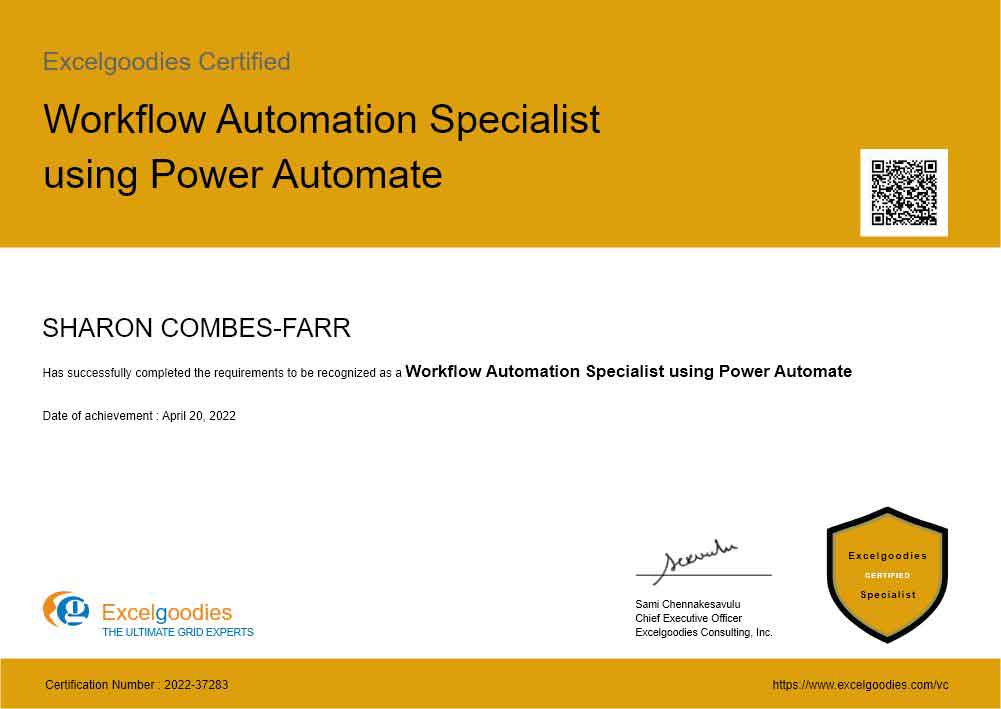
Certification

Workflow Automation Specialist

View sample certificate

Course Fee

$499

Check what’s included?

Power Automate

floating_menu floating_menu floating_menu

Batch starts on

Jul 13

From Doer to Builder

Power Automate + Copilot + Claude + RPA

Master the Automation Skill Companies Are Hiring For - in Just 2 Weeks.

Perfect for professionals in Finance, Supply Chain and Operations ready to automate approvals, reports, emails and entire business processes - build your first flow in session one, "no coding knowledge required".

You'll Automate Every App You Already Use.

The tools analysts in Finance, Supply Chain and Operations live in every day - you'll connect, trigger and automate all of them:

O
Outlook

Trigger flows from email; send and file messages automatically.

T
Teams

Post alerts and run approvals where your team already works.

X
Excel

Read and update table data without opening the file.

S
SharePoint

Use lists and libraries as your automation's data store.

OD
OneDrive

Watch folders and move, rename and organise files for you.

F
Microsoft Forms

Turn each submission into an instant, automatic action.

SQL
SQL Server

Pull from and write back to your databases on schedule.

BI
Power BI

Refresh datasets and turn data alerts into actions.

DV
Dataverse

Store and manage the structured data behind your flows.

RPA
Power Automate Desktop

Automate legacy apps that have no connector of their own.

AI
AI Builder

Read invoices, receipts and forms straight into data.

AI+
Copilot + Claude

Describe a flow in plain English and let AI build it.

In 2 Weeks, All of This Runs Without You.

Month-End Reports That Send Themselves – Your report builds, formats and emails itself - on schedule, every time.

Approvals Without a Single Follow-Up – POs, invoices and requests route, remind and escalate on their own.

Zero Copy-Paste Between Excel and Outlook – Data moves across Excel, Outlook, Teams and SharePoint by itself.

Your Old ERP, Automated Anyway – Desktop RPA clicks through legacy screens that have nothing to connect to.

Invoices That Enter Themselves – AI Builder reads invoices, receipts and forms, and files the data for you.

Flows Built in Plain English – Describe it to Copilot + Claude; they design it and fix it with you.

In 2 Weeks, All of This Runs Without You.

Month-End Reports That Send Themselves – Your report builds, formats and emails itself - on schedule, every time.

Approvals Without a Single Follow-Up – POs, invoices and requests route, remind and escalate on their own.

Zero Copy-Paste Between Excel and Outlook – Data moves across Excel, Outlook, Teams and SharePoint by itself.

Your Old ERP, Automated Anyway – Desktop RPA clicks through legacy screens that have nothing to connect to.

Invoices That Enter Themselves – AI Builder reads invoices, receipts and forms, and files the data for you.

Flows Built in Plain English – Describe it to Copilot + Claude; they design it and fix it with you.

Ideal For:

Excelgoodies

Finance & Accounting

tired of manually keying invoices, reconciling sheets and routing expense approvals.

Excelgoodies

HR Professionals

buried in leave requests, onboarding checklists and offer letters that repeat every hire.

Excelgoodies

Operations

who lose hours moving tickets, updating statuses and emailing the same reports.

Excelgoodies

Supply Chain & Procurement

juggling PO approvals, stock alerts and endless vendor follow-up emails.

Excelgoodies

Admin & Managers

who want to stop doing — and stop nagging others to do — the same manual steps daily.

Excelgoodies

IT & Citizen Developers

asked to deliver automation across teams without writing and maintaining custom code.

A snapshot of what you'll be learning in 2-weeks.

Power Automate Course Syllabus

Foundations of Power Automate

  • The Power Platform & where Automate fits
  • Cloud vs Desktop vs Business Process flows
  • Triggers, actions & the flow designer
  • Connectors, connections & authentication
  • Environments, licensing & the free tier
  • Your first flow: trigger to action

Building Cloud Flows

  • Automated, instant & scheduled flows
  • Dynamic content & expressions
  • Conditions, switches & branching
  • Loops: Apply-to-each & Do-until
  • Variables, arrays & data operations
  • Error handling, run-after & retries

Approvals & Notifications

  • Start & wait for an approval
  • Sequential vs parallel approvals
  • Approval routing & escalation logic
  • Teams & Outlook adaptive cards
  • Email & mobile notifications
  • Capturing responses & outcomes

Working with Data & Documents

  • SharePoint lists & libraries
  • Excel Online (tables) read & write
  • Microsoft Forms → actions
  • OneDrive & file management
  • Generate documents from templates
  • Intro to Dataverse tables

Desktop Flows & RPA

  • Installing Power Automate Desktop
  • Recording desktop & web actions
  • UI & image-based automation
  • Reading/writing files & Excel
  • Attended vs unattended runs
  • Triggering desktop flows from the cloud

AI Builder & Document Processing

  • Intro to AI Builder models
  • Invoice & receipt processing (OCR)
  • Form & document data extraction
  • Text recognition & classification
  • Feeding extracted data into approvals
  • Prediction & sentiment basics

AI-Powered Automation with Microsoft Copilot

  • Copilot in Power Automate
  • Describe-it-to-build-it flow creation
  • Editing & refining flows with Copilot
  • Generating expressions from prompts
  • Limitations & what to verify
  • Licensing & org requirements

Supercharging Automation with Claude AI

  • Designing flow logic with Claude
  • Writing & debugging expressions
  • Mapping a process before you build it
  • Documenting flows in plain English
  • Claude vs Copilot: when to use which
  • An AI-augmented automation workflow

Power Automate System Requirements

  • A Microsoft 365 work/school account
  • Windows 10/11 for Power Automate Desktop (RPA)
  • Modern browser (Edge/Chrome) for cloud flows
  • Stable high-speed internet connection
  • 8 GB RAM minimum (16 GB recommended)
  • Secondary monitor recommended for following along

Advanced power platform courses – now available.

Take Power Automate to the Next Level

🧩 ✓ Includes Power Automate training

Power Apps & Power Automate

Learn Power Automate alongside low-code app building — one course, broader skills.

View Details →
🟪 ✓ Includes Power Automate training

Microsoft Power Platform & AI

Power BI + Power Apps + Power Automate + Copilot Studio — the complete Microsoft cloud stack.

View Details →
Live instructor-led training

Taught by Microsoft-Certified Trainers

All our classes are live,
hands-on and with
real-trainers.

Live instructor-led training

Build Real-World Automations.

12 Projects. Real Work, Automated.

You don't leave with theory - you leave with 12 working automations. Here's what six of them replace:

The Approval That Approves Itself

Expenses, leave and purchase orders land with the right person, who taps approve in email or Teams. Late? It escalates on its own.

days of back-and-forthapproved in minutes

The Inbox That Files Itself

Every incoming invoice, resume or signed contract is saved to the right folder, renamed and dated the moment it arrives.

~3 hrs/week by hand0 – fully automatic

The Assistant That Never Forgets

Automatic nudges for pending sign-offs, deadlines and renewals - before they're overdue. No more "just following up" emails.

missed deadlinesnothing slips

One Form, Everything Happens

A submitted request creates the record, confirms to the requester and alerts the right team - leave, IT tickets, vendor onboarding.

5+ manual steps1 form, done

The Report That Sends Itself

Your Monday-morning report compiles and emails itself on schedule - sales, attendance, stock or open tickets. Hands never touch it.

~1 hr every weeksends itself

The Robot That Reads Invoices

AI Builder lifts amounts and vendor details straight off invoices and receipts, drops them into an approval - zero manual entry.

keying every lineread by AI

Power Automate Specialist Certification

Certification: Workflow Automation Specialist using Power Automate

A piece of paper means nothing if you can’t apply the skills. Our certifications are industry-recognized and backed by hands-on training—ensuring you’re not just qualified, but ready to perform from day one.

Eligibility:

On clearing post-training assessment.

View Sample Certificate

Shareable certificate

Add to your LinkedIn profile

Excelgoodies

Level : ASSOCIATE

Certificate Code : EG-ASC-003

Eligibility:

On clearing post-training assessment.

Shareable certificate

Add to your LinkedIn profile

Training Schedule

Jul 13 - Jul 24, 2026

Session 1

Mon, 13 Jul

11:00 AM - 01:00 PM ET

Session 2

Tue, 14 Jul

11:00 AM - 01:00 PM ET

Session 3

Wed, 15 Jul

11:00 AM - 01:00 PM ET

Session 4

Thu, 16 Jul

11:00 AM - 01:00 PM ET

Session 5

Fri, 17 Jul

11:00 AM - 01:00 PM ET

Holiday

Sat, 18 Jul

Weekend

Holiday

Sun, 19 Jul

Weekend

Session 6

Mon, 20 Jul

11:00 AM - 01:00 PM ET

Session 7

Tue, 21 Jul

11:00 AM - 01:00 PM ET

Session 8

Wed, 22 Jul

11:00 AM - 01:00 PM ET

Session 9

Thu, 23 Jul

11:00 AM - 01:00 PM ET

Session 10

Fri, 24 Jul

11:00 AM - 01:00 PM ET

Limited Seats. Registration Closing Soon

Have Questions?

Tel:

+1 650 491 3131

Email:

support@excelgoodies.com

Projects & Assignments

What's included?

  • 20 hours of live, instructor-led sessions
  • 12 hands-on automation projects (cloud + desktop)
  • 2 AI-powered sessions (Copilot + Claude)
  • Ready-to-reuse flow templates & sample files
  • 30-day post-training email support
  • Power Automate Associate Certificate

Upcoming Cohort

Starts On

Time

11:00 AM - 01:00 PM ET

Course Fee

Individual

1 seat

$499

Team of 5

Save $495

$1,999

$3,495

Power Automate Training FAQs

Yes. Power Automate is a visual, no-code/low-code tool – if you can build an Excel formula and send an email, you can build a flow. We start from the basics and build up, so non-technical professionals finish confident.

Most professionals lose 5–10 hours a week to repetitive manual tasks. Once a flow is built it runs forever, for free – so a few hours of setup keeps paying you back week after week. You'll leave with 12 automations already started.

IT can't build every small workflow each department needs. Power Automate lets the people who actually feel the pain fix it themselves – safely, within the governance guardrails we teach – without waiting in an IT backlog.

Yes. We can invoice your finance team directly, so your employer can sponsor your seat — company card or PO both work. A group of 5 joins the same public schedule at $1,999 instead of $2,495. For teams of 15 or more, we can run a private, customized schedule. Contact us and we'll set it up

No. The free tier included with most Microsoft 365 accounts covers cloud flows and Power Automate Desktop for the course. Premium connectors and AI Builder are demonstrated live; they aren't required to follow along.

Yes — it's 20 hours of hands-on building, not a tour. You won't know every connector, but you'll confidently build, run and fix the automations your work actually needs.

No traditional coding. The advanced bits use simple expressions and logic, taught step by step. If you can write an Excel formula, you can handle the hardest parts here.

Macros stop at the edge of your spreadsheet. Power Automate reaches across apps — SQL, Teams, Outlook, AI — and runs on its own, on a schedule or trigger. It's the step up from automating in Excel to automating around it.

It's built for your role. Every example is analyst work in finance, supply chain and operations — consolidating data, refreshing reports, flagging numbers that cross a line. No IT background assumed.

Yes — that's what desktop automation (RPA) is for. When a system has no connector, you build a robot that logs in, runs the export and moves the file for you.

The skills transfer directly, and you keep reusable templates to adapt. A few features depend on your license or IT settings — we show you which, so you know what runs as-is.

Standard automations (Outlook, Teams, Excel, SharePoint) run within your normal Microsoft 365 permissions. The premium-only features are demonstrated in class, so you'll know exactly what—if anything—to ask IT to enable.

Cloud flows run in the browser—nothing to install. Desktop automation uses Power Automate Desktop, a free Microsoft app for Windows, and we walk you through setup.

It's a Microsoft tool, so it works best with Microsoft 365. It connects to some non-Microsoft services, but without Microsoft 365 you'll be limited.

AI is changing how automations are built, not the need for them. You'll use AI Builder, Copilot and Claude directly, so you move with the shift.

AI helps you design a flow; Power Automate is what actually runs it—reliably, on a trigger, connected to your real apps.

Sessions are live and interactive, so you can ask as you go. Miss one or need to catch up? Talk to us and we'll help you get back on track.

Live, with a real instructor you can question in real time—not playback. You build alongside the trainer.

Sessions run in fixed slots shown on the schedule page. Ask about other batches if the listed time doesn't suit your time zone.

You get ready-to-reuse templates and sample files, not just a demo. You build along in class and keep everything to adapt afterward.

Yes—an ExcelGoodies Power Automate Specialist certificate for your LinkedIn and resume. It's a training credential; what wins with employers is the working automations you can show.

More questions ?

A Glimpse of What You Can Automate

Things You'll Be Able to Build

Approvals in Teams & OutlookAuto-save email attachmentsScheduled & recurring reports Sync Excel ↔ SharePointTrigger actions from FormsRead invoices & forms with AI Automate desktop apps (RPA)Connect 1,000+ appsInstant alerts & reminders Multi-step approval routingBuild flows with Copilot + Claude
AUTOMATION

About The Trainer

Mr. Sami

MCT, MCP, MEE, MOS

30,000+

Students Trained

18+

Year of Experience

4.9

Reviews

Mr. Sami is an exceptionally accomplished and certified Microsoft Trainer, possessing extensive expertise in the fields of Finance, HR, and Information Technology. With an impressive 18-year tenure in the industry, he has successfully trained and empowered over 30,000 professionals, and the number continues to grow.

He has undertaken assignments with the renowned IRS, The World Bank, Tata Chemicals, Buckman Laboratories, Standard Chartered, ING Barings and much more. His nature of going that Extra Mile has got him the startling popularity amongst the Excelgoodies prominent clients.

Government Institutions We've Worked With.

Trusted by Government Entities

Government Clients Government Clients Government Clients Government Clients Government Clients Government Clients Government Clients Government Clients Government Clients Government Clients Government Clients Government Clients Government Clients Government Clients

Corporate Power Automate Training

bi_report_automation_mob

Avail additional 10% Corporate Benefit on the total course fee for 15+ participants.

Mr. Perrie Smith

Business Associate

Prove you're human: Type the code shown.

=
Excelgoodies

Esteemed Clientele

Esteemed Clientele Esteemed Clientele Esteemed Clientele Esteemed Clientele Esteemed Clientele Esteemed Clientele Esteemed Clientele Esteemed Clientele Esteemed Clientele Esteemed Clientele Esteemed Clientele Esteemed Clientele Esteemed Clientele Esteemed Clientele Esteemed Clientele Esteemed Clientele Esteemed Clientele Esteemed Clientele Esteemed Clientele Esteemed Clientele Esteemed Clientele Esteemed Clientele Esteemed Clientele Esteemed Clientele Esteemed Clientele Esteemed Clientele Esteemed Clientele Esteemed Clientele Esteemed Clientele Esteemed Clientele Esteemed Clientele Esteemed Clientele Esteemed Clientele Esteemed Clientele Esteemed Clientele Esteemed Clientele Esteemed Clientele Esteemed Clientele Esteemed Clientele Esteemed Clientele Esteemed Clientele Esteemed Clientele Esteemed Clientele Esteemed Clientele Esteemed Clientele Esteemed Clientele Esteemed Clientele Esteemed Clientele Esteemed Clientele Esteemed Clientele Esteemed Clientele Esteemed Clientele Esteemed Clientele Esteemed Clientele Esteemed Clientele Esteemed Clientele Esteemed Clientele Esteemed Clientele

Thousands Trained. Here’s What They Say.

Total Reviews 500
Average Rating
4.5
Excelgoodies Excelgoodies Excelgoodies Excelgoodies Excelgoodies
Why Excelgoodies image

Thousands Trained. Here’s What They Say.

Google Reviews

Industry Insights

Industry Insights

APPLICATION DEADLINE

Registration Closes
on .

Prove you're human: Type the code shown.

=
Excelgoodies